
Fraud Zero Free Trial

False positives are a huge problem and we can prove it.
Send us 90 days of your rejected orders to evaluate and we'll show you how many were false positives.
A luxury retailer asked us to process a data set of orders it previously rejected due to suspicion of fraud. The results were clear: working without the benefit of big data and relying on retailer-managed fraud tools had created the perfect false positive storm and wreaked havoc on top line revenue.
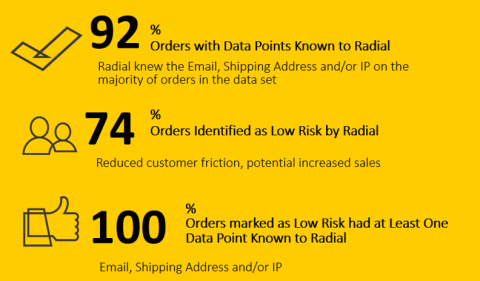
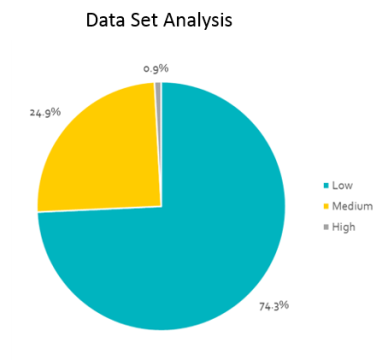
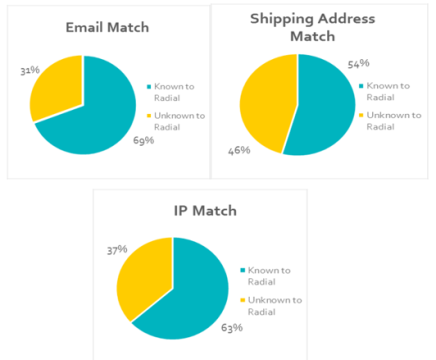
Here’s what we found: 81% of the Orders Rejected by the Retailer Were False Positives
That's $210,052 of lost revenue in just a few weeks. With a 3% sales lift using Radial's Fraud Zero solution, this retailer stands to increase top line annual revenue by $1.5 million.
How Does It Work?
- Send us a batch of orders that you previously declined because of suspicion of fraud.
- We'll run them through our Fraud Zero service.
- We'll tell you what we would've approved (and guaranteed chargeback liability).
Send us this...

We'll send you...
How Does It Work?
Step 1: Send us a subset of past orders.
Send us all orders over a period of time, or just those you've declined.
- The more details you send, the better we can prove our success.
- Click here to see more details on the file submission process.
Step 2: We'll run the orders through our Fraud Zero service as though they're live orders.
We'll tell you how we would've dispositioned the order and respond with a simple Approve or Reject indicator.
Step 3: Calculate the savings!
Anything we approved that you previously rejected is found money!
File Submission Details
- Place a subset of past orders into a CSV File.
- A CSV file can hold 1,000 rows. If you want to send more, send it over multiple files
- Click here for detailed field-level specifications.
- Upload the CSV to Radial via FTP.
- Click here for help on using FTP.
- We can also accept a physically-delivered, password protected file.
Some guidelines
- Use one line for each item in the order (if an order contains two items, put one on each line).
- Similarly, use one line for each payment method on the order (if the order was paid using a combination of credit card and gift card).
- Keep rows related to a single order in sequential order in the file.
- If data is split over multiple files, make sure an order is not split between files. Keep all of an order's lines together in the same file.
FAQ
- How long will it take to receive the results?
A: Depending on how many requests we have the time may vary, but generally give us about a week.
- Will you be contacting any of the customers in this trial data set?
A: Absolutely not.
- Can I send highly sensitive PII data? If yes, how will you protect it?
A: Yes you can. In fact, the more you send, the better job we can perform. We have a secure FTP file transfer process setup to transmit the data.
- How many records can I send?
A: As many as you'd like! Since there is a limit of 1000 rows of data per file, you many need to send multiple files.
- What are the guidelines for orders with >1 line item?
A: You must use one line of data for each item in the order.
- What are the guidelines for orders with >1 payment method?
A: You must use one line of data for each payment method in the order.
- Any other guidelines?
A: All rows related to a single order should be provided in sequential order in the CSV file. If you split data into two or more files, make sure an order is not split between files. Keep all of an order's lines together in the same file.